Execution Modes
The mode parameter controls what happens when a recurring job's next tick
becomes due while a prior invocation is still running. Four modes are
available, matching the bus's execution modes.
await self.scheduler.run_every(
    self.sync_data,
    minutes=5,
    name="sync_data",
    mode="single",  # or "restart", "queued", "parallel"
)
mode= is accepted by schedule() and all seven convenience methods:
run_in, run_once, run_every, run_minutely, run_hourly,
run_daily, and run_cron.
On-Grid Firing
Recurring jobs reschedule the next occurrence at dispatch time — before the current invocation runs. This means an overrunning job fires on its grid, not interval-after-completion.
A job scheduled every 30 seconds that takes 45 seconds fires at T+0, T+30 (held by the mode), T+60, T+90 — not T+0, T+45, T+75. A job that completes within its interval fires at identical times to before.
The mode governs what happens when that next-tick entry becomes due while the current run is still in flight.
The Four Modes
single — drop while running (app default)
single is the default for app jobs. When the next tick becomes due while
the prior invocation is still running, the scheduler drops the re-fire.
The running invocation continues uninterrupted.
class PollApp(App[AppConfig]):
    async def on_initialize(self):
        # App jobs default to single — no mode= needed.
        await self.scheduler.run_every(
            self.sync_data,
            seconds=30,
            name="sync_data",
        )

    async def sync_data(self):
        # Only one copy of this job runs at a time.
        # A re-fire that arrives while this is running is dropped.
        self.logger.info("Syncing data")
        await self.api.call_service(
            "homeassistant", "update_entity",
            entity_id="sensor.outdoor_temperature",
        )
The dropped re-fire is logged at DEBUG. No WARNING is emitted — this is expected behavior, not an error.
single is the right choice for jobs that mutate shared state, call a
slow service, or hold a resource. One invocation at a time prevents
duplicate side effects.
restart — cancel and replace
restart cancels the running invocation when the next tick becomes due,
then starts a fresh one.
class RefreshApp(App[AppConfig]):
    async def on_initialize(self):
        await self.scheduler.run_every(
            self.refresh_report,
            minutes=5,
            name="refresh_report",
            mode="restart",
        )

    async def refresh_report(self):
        # If the next tick arrives before this finishes,
        # the in-flight run is cancelled and a fresh one starts.
        self.logger.info("Refreshing report")
        await self.api.call_service(
            "script", "turn_on",
            entity_id="script.generate_report",
        )
The cancelled invocation receives CancelledError at its next await.
Making jobs cancellation-safe is the author's responsibility. The framework
cancels the task; try/finally runs cleanup as the cancellation propagates.
Suppressing the CancelledError keeps the task alive and defeats the restart.
restart is the right choice for "latest wins" patterns: a report
refresh where only the most recent run matters, or a cache reload where
a stale in-flight run should give way to a fresher one.
Cancelled invocations have side effects
A job cancelled mid-run may have already mutated state or called a
service. The framework provides no automatic rollback. Jobs that
mutate state mid-run need cancellation handling with try/finally.
single or queued avoid partial execution entirely.
queued — serialize in arrival order
queued runs every tick, one at a time, in the order ticks arrived.
Ticks that become due while an invocation is running are held and
dispatched sequentially after the current invocation completes.
class AuditApp(App[AppConfig]):
    async def on_initialize(self):
        await self.scheduler.run_every(
            self.run_audit,
            minutes=2,
            name="run_audit",
            mode="queued",
        )

    async def run_audit(self):
        # Every tick runs in arrival order, one at a time.
        # If the queue reaches 10 pending ticks, the newest is dropped.
        self.logger.info("Starting audit run")
        await self.api.call_service(
            "script", "turn_on",
            entity_id="script.run_audit",
        )
The queue holds at most 10 pending ticks. When the queue is full, the newest tick is dropped and logged at DEBUG. Already-queued ticks are unaffected. This cap prevents unbounded memory growth when a slow job falls behind a fast schedule.
queued is the right choice when every tick must be processed and order
matters: sequential audit runs, command dispatch, or anything where
skipping an execution would leave the system in an incorrect state.
parallel — concurrent (framework default)
parallel imposes no overlap guard. Multiple invocations of the same job
run concurrently. This is the framework default for internal jobs.
class MetricApp(App[AppConfig]):
    async def on_initialize(self):
        await self.scheduler.run_every(
            self.record_reading,
            seconds=10,
            name="record_reading",
            mode="parallel",
        )

    async def record_reading(self):
        # Each tick spawns an independent recording task.
        # Multiple readings can run concurrently.
        self.logger.info("Recording sensor reading")
        await self.api.call_service(
            "homeassistant", "update_entity",
            entity_id="sensor.outdoor_temperature",
        )
parallel is the right choice for stateless, idempotent work where each
invocation manages its own isolated resources.
Default Mode: Tier-Aware
The default mode depends on the tier — who registered the job. App jobs and framework-internal jobs get different defaults.
Framework-internal jobs are the scheduler entries Hassette registers for
itself — not through self.scheduler.* in an app — to run its own
services.
| Registration tier | Default mode | Why |
|---|---|---|
App job (self.scheduler.*) |
single |
Prevents a job from running twice at once in user automations |
| Framework-internal job | parallel |
Preserves concurrent behavior required by the framework |
An explicit mode= always overrides the tier default.
One-Shot Jobs
mode= is accepted on one-shot schedules (run_in and run_once) for
API uniformity. It has no overlap effect — a one-shot fires once and is
removed, so no overlap is possible.
class CleanupApp(App[AppConfig]):
    async def on_initialize(self):
        # mode= is accepted on run_in for API uniformity.
        # It has no overlap effect — a one-shot never re-fires.
        await self.scheduler.run_in(
            self.cleanup,
            delay=60,
            name="delayed_cleanup",
            mode="single",
        )

    async def cleanup(self):
        self.logger.info("Running cleanup")
The value passed is stored on the job and appears in the jobs API response, but it never triggers guard logic.
Observability
Suppressed and dropped counts
Each job with a non-parallel mode tracks two live counters:
- Suppressed — ticks dropped by
singlewhile the job was running. - Dropped — ticks discarded by
queuedwhen the queue was at its cap.
These counts appear in the monitoring UI's Jobs view when non-zero, alongside the job's mode. They are live-only diagnostics — held in memory, reset to zero when the process restarts, never persisted to the database.
A non-zero suppressed count on a single job indicates ticks arrive
faster than the job completes. If that represents lost work, consider
queued. If it represents expected deduplication, single is correct.
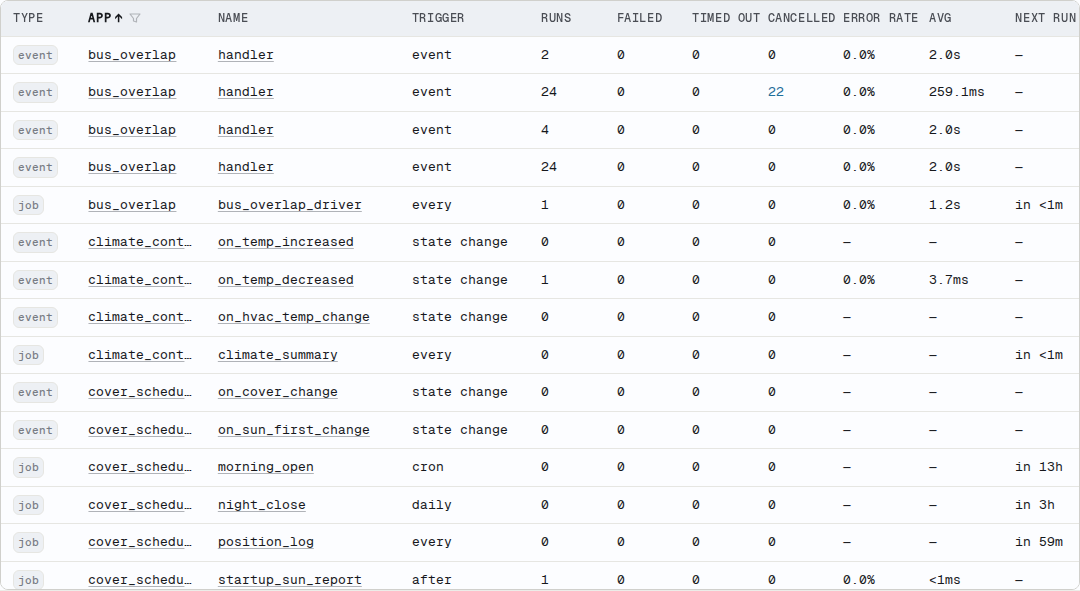
Cancelled counts
restart cancels the running invocation on every re-fire, so a busy
restart job accumulates cancelled executions. Cancelled is a persisted
execution status, not a live counter. The telemetry database records each
one, and the monitoring UI surfaces a cancelled count separate from
failures.
A restart job working as designed shows a high cancelled count and a 100%
success rate. Cancellation is the intended outcome, so it never counts
against the success rate. The cancelled column appears in the Handlers table
for both jobs and event handlers.
Stall detection
A job that holds its execution-mode guard — any mode except parallel —
longer than 60 seconds without completing emits a WARNING. This is the
only WARNING the execution mode feature generates. Suppressed and dropped
ticks always log at DEBUG.
The per-job timeout still applies and ultimately releases the guard
when it fires. The stall WARNING is an early signal, independent of the
timeout.
Mode in the monitoring UI
The mode is persisted for each job and displayed in the monitoring UI's Jobs view. The mode appears alongside the job's next run time, suppressed count, and dropped count.
Run hassette job on a running instance to see each job's mode from
the command line. The live suppressed and dropped counts are not in the
default table — use hassette job --json to read them alongside every
other field.
See Also
- Scheduling Methods: full parameter reference, including
name,group,jitter,timeout, andif_exists - Job Management: cancellation, groups, error handling,
and the
ScheduledJobobject - Triggers: built-in trigger types and writing custom triggers
- Bus Execution Modes: the same four modes on event handlers