Scheduler
The scheduler runs functions after a delay, at a specific time, or on a repeating interval. self.scheduler is available on every App instance. Hassette creates it at startup and runs all jobs in the async event loop. Sync callables are wrapped automatically.
All scheduling methods must be awaited
Every run_*, schedule(), and add_job() call returns a coroutine. Without await, the job is never scheduled and no error is raised. A forgotten await produces a HassetteForgottenAwaitWarning naming the offending app when the coroutine is GC'd (subject to configuration). Pyright's reportUnusedCoroutine catches this at edit time — see Enabling Pyright.
How It Works
All scheduling methods delegate to schedule(func, trigger). schedule pairs a callable with a trigger object — a value like After(seconds=5) or Daily(at="07:00") that describes the schedule. Sync callables (plain def) are wrapped in a thread pool automatically, so blocking I/O is safe without extra setup.
Each call returns a ScheduledJob handle. The handle cancels the job, inspects its next fire time, or checks whether it has already run. Job Management covers the full handle API.
Common Patterns
Run after a delay
run_in schedules a one-shot job that fires after a fixed number of seconds.
from hassette import App, AppConfig


class DelayApp(App[AppConfig]):
    async def on_initialize(self):
        # Run in 5 seconds
        await self.scheduler.run_in(self.turn_off_light, delay=5.0, name="turn_off_light")

        # Run in 10 minutes (using TimeDelta or seconds)
        await self.scheduler.run_in(self.check_status, delay=600, name="check_status")

    async def turn_off_light(self):
        pass

    async def check_status(self):
        pass
The delay parameter accepts seconds as a float. The job fires once and does not repeat.
Run on a repeating interval
run_every schedules a job that fires repeatedly on a fixed interval.
from hassette import App, AppConfig


class IntervalApp(App[AppConfig]):
    async def on_initialize(self):
        # Every 10 seconds
        await self.scheduler.run_every(self.poll_api, seconds=10, name="poll_api")

        # Every hour (using hours parameter)
        await self.scheduler.run_every(self.hourly_check, hours=1, name="hourly_check")

    async def poll_api(self):
        pass

    async def hourly_check(self):
        pass
seconds, minutes, and hours are all accepted. The scheduler is drift-resistant. Each run fires relative to the previous scheduled time, not the previous actual time.
Run daily at a fixed time
run_daily schedules a job that fires once per day at a wall-clock time.
from hassette import App, AppConfig


class DailyApp(App[AppConfig]):
    async def on_initialize(self):
        # Every day at midnight (default)
        await self.scheduler.run_daily(self.task, name="task_daily")

        # Every day at 7:00 AM (wall-clock, DST-safe)
        await self.scheduler.run_daily(self.morning_routine, at="07:00", name="morning_routine")

    async def task(self):
        pass

    async def morning_routine(self):
        pass
The at parameter accepts "HH:MM" strings. Without at=, the job fires at midnight. run_daily is DST-safe — it fires at the configured wall-clock time regardless of clock changes. The timezone setting in hassette.toml controls which timezone "wall-clock" means; when unset, the process timezone applies.
Synchronous usage (AppSync only)
AppSync is an alternative base class for automations that must call blocking libraries. Its lifecycle hooks run in a worker thread outside the async event loop. self.scheduler.sync exposes a SchedulerSyncFacade that mirrors all scheduling methods as blocking calls. The Apps page covers the AppSync pattern.
name= identifies each job in logs and the monitoring UI. It must be unique within the app instance — duplicates raise ValueError. See Scheduling Methods for details.
Conditional Execution
where= accepts a predicate — a callable returning bool — checked right before the handler runs. When the predicate returns False, the handler doesn't run. The job body needs no guard clause of its own.
await self.scheduler.run_daily(
    self.morning_routine,
    at="07:00",
    name="morning_routine",
    where=self.home_is_occupied,
)
A predicate with no ScheduledJob annotation takes zero arguments (the common case). A predicate with a positional parameter annotated as ScheduledJob receives the job instance, for access to job.args and job.kwargs. Recurring jobs keep their schedule regardless of the outcome. Only a one-shot job (run_in, run_once) is consumed when skipped. Register a new one-shot job to retry a skipped execution.
A skipped run still shows up in telemetry, with a skipped status and no error. The monitoring UI distinguishes "didn't run because the condition wasn't met" from "ran and failed."
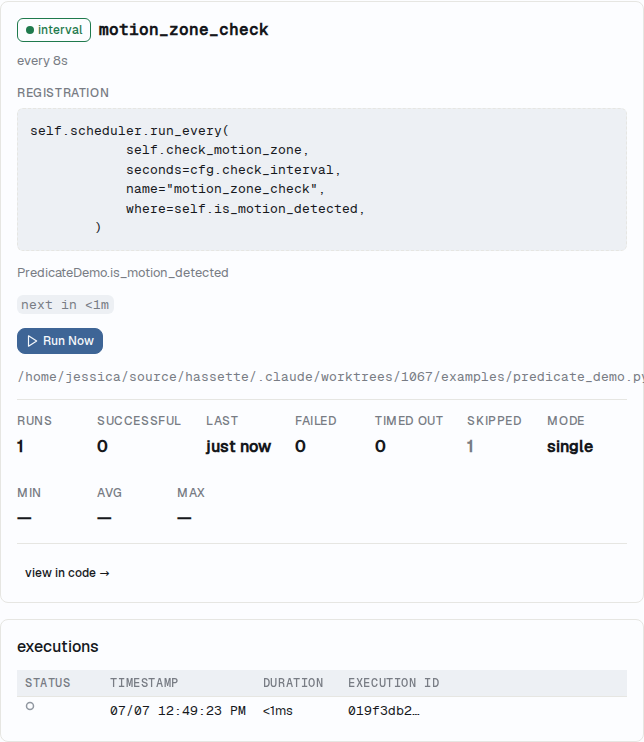
See Scheduling Methods for the full parameter reference, including predicate arity rules and exception handling.
Verify It's Working
Run hassette job to see all scheduled jobs for your running instance, where <key> is the app identifier from hassette.toml (e.g., delay_app). Run hassette log --app <key> --since 5m to see job execution output.
Next Steps
- Scheduling Methods: full method reference, cron expressions, and per-job options including
group,jitter, andif_exists - Triggers: built-in trigger types,
TriggerProtocol, and writing custom triggers - Job Management: cancelling, grouping, error handling, and the
ScheduledJobobject - Execution Modes: controlling overlap behavior for recurring jobs —
single,restart,queued,parallel